
|
Checkout, Recalculate Continue buttons |
Post Reply 
|
Page <1234> |
| Author | |
Muppet 
Regular 
Joined: 17 April 2006 Location: United Kingdom Status: Offline Points: 52 |
 Post Options Post Options
 Thanks(0) Thanks(0)
 Quote Reply Quote Reply
 Posted: 15 March 2013 at 7:07pm Posted: 15 March 2013 at 7:07pm |
|
AudioAudio,
If you remove the RomanCart buttons and just use the "Continue Shopping" and "Recalculate" buttons, the "checkout" button will disappear, leaving only the Paypal button which would fulfill your purpose. Personally I can't think why you would want to limit your customers to only paying through Paypal. Let them checkout using the Checkout button, fill in the form and pay by Credit/Debit card if they want - our sites have far more credit card payments than Paypal payments. And it doesn't cost you anything extra. People I think are used to filling in their details at the checkout. George |
|
 |
|
|
audioaudio
Regular
Joined: 12 June 2012 Status: Offline Points: 45 |
Post Options
Thanks(0)
Quote Reply
Posted: 16 March 2013 at 2:25am |
Thank you for all the time and effort you have put into giving me (and other RomanCart users), this very valuable help, which RomanCart should be ashamed of themselves that they are not supporting their current customers more than they have done. Anyway, re the above quote. Are you saying that there is a way to remove just the checkout button, without having to use any of the coding that you have listed ? I tried to find such a setting but could not see it, and asked support but got no help there at all on this. Did I understand the above quote incorrectly ? Sincerely, AudioAudio. |
|
|
|
|
audioaudio
Regular
Joined: 12 June 2012 Status: Offline Points: 45 |
Post Options
Thanks(0)
Quote Reply
Posted: 16 March 2013 at 3:20am |
I only have paypal as a payment gateway, but I don't want to make it so that they can only pay if they have a paypal account, what I want to achieve is for them to be taken straight to the paypal page where they can then click on the "pay with debit or credit card" link on the paypal page, where they would fill in those details, if, that is, they do not have a paypal account. I think that filling in half of the details after clicking the checkout button in romancart, then being taken to paypal only to have to click another button to finish payment by filling in another form with just the card details seems silly to me. If you just go to the paypal page and click the link in there, you just fill in all the details at one time, i.e. name, address and credit card details. This seems to me to be the best way to go through the checkout, as seemlessly and easily as possible for the customer. I think there should be a setting within roman cart to remove the form filling part if the seller wants this.I would not be asking all these questions about making my own buttons, or have to use paypal express checkout, if this was the case. Incidentally, the reason why I have express checkout is because I asked about the removal of the form from within the romancart basket, and was told by support that having express checkout would remove it. Well, it does not, when the checkout button is still there. only |
|
|
|
|
audioaudio
Regular
Joined: 12 June 2012 Status: Offline Points: 45 |
Post Options
Thanks(0)
Quote Reply
Posted: 16 March 2013 at 6:21am |
|
Hi again,
I have been trying to make the code work and to a degree it does, but with my images in place, the "continue shopping" button is not aligned to the right, and I have found that no matter what I do, the paypal button has a gap between the lowest button and move with it, leaving a big gap between the checkout button and itself. Cab you help with this at all ? 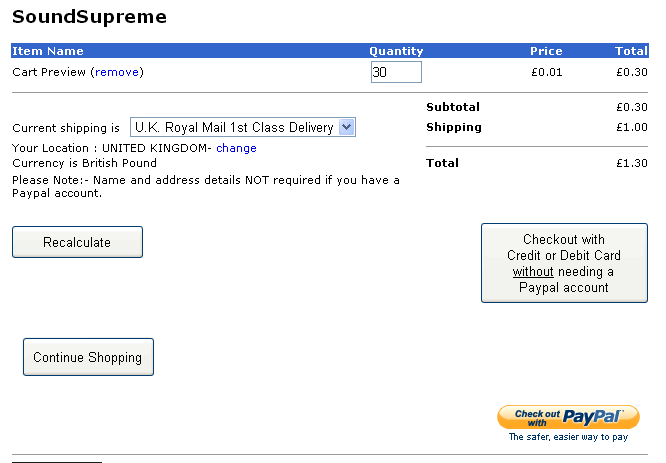 Also, If I try to just have the "recalculate" and "continue shopping" buttons, and no "checkout" button, they appear but still, the express checkout button is right at the bottom, and looks completely wrong. It's as though that button has an invisible margin above it that cannot be removed. Any help appreciated. Also, Ideally, If I can get rid of the checkout button, and have the other buttons in the right place, I would like to be able to put some text just above the paypal button, something along the lines of "to checkout using your credit card without needing a paypal account, click the paypal button below". Thank you for your help. |
|
|
|
|
audioaudio
Regular
Joined: 12 June 2012 Status: Offline Points: 45 |
Post Options
Thanks(0)
Quote Reply
Posted: 18 March 2013 at 12:37pm |
|
Can anyone shed some light on this problem please ?
(perhaps support would like to get their web specialists to give some help to their paying customers on this one. There are many who would like to know these answers). Thank you. |
|
|
|
|
Support Oliver
RomanCart Team 
Joined: 06 April 2010 Status: Offline Points: 333 |
Post Options
Thanks(0)
Quote Reply
Posted: 18 March 2013 at 1:30pm |
|
Hi,
We are more than happy to take a look. Code can be completely down to the individual. However please email the team at support@romancart.com with your Store ID and Support Tag. This might be something very simple but we need to see how your cart has been set up. Kind Regards Oliver |
|
|
|
|
audioaudio
Regular
Joined: 12 June 2012 Status: Offline Points: 45 |
Post Options
Thanks(0)
Quote Reply
Posted: 18 March 2013 at 2:17pm |
This should come as no surprise to you but but I am getting tired of the lack lustre support RomanCart is giving to me. I had already asked this question to support under the support tag :- RomanCart Support Request - Storeid: 58884 Support Tag: 0ALUGF8Y9E and sent this reply to previous reply from James, which I sent on 11-03-13 at 19:01 I never got a reply to this text below :- "Hi James, I have read the page you gave me a link to, and understand how to put the url of my button images into the pre-made html for each button, but I do not know how to format them to make them appear where they should be. At the moment they appear on a single line about 1mm above the "roman pawered logo". I am presuming I need to add some sort of formatting text to align the buttons, so can you please help with this. Sincerely, Colin." So you should be able to understand why I am getting really fed up that RomanCart do not seem to want to help it's customers, as everything is either "we can't" or you just don't respond. I have read so many posts though this forum where you just stop writing to peoples questions. I want and need help with this and I would prefer it if this was done openly on this forum so you cannot fob me off as you have done in the past. I am asking only for needed help, nothing special, to make the cart work the way I would like it to, and if you got your collective web mastering people together and made the customisation facility a reality (something that should take a couple of days for knowledegable people like you), as you said you would be doing, then this thread would not have been needed. At the moment the web site is offline to romancart however, I can test the web site perfectly using preview mode in my browser, so any help you can give can still be tried out. I would appreciate some proper, clear, genuine help with this matter please. |
|
|
|
|
jackslad
Senior Member 
Joined: 07 April 2009 Status: Offline Points: 412 |
Post Options
Thanks(0)
Quote Reply
Posted: 19 March 2013 at 6:43pm |
|
I have followed George's instructions and have managed to set up the cart as I want using my own graphics. Many thanks George!
|
|
|
_____________________________
Reflections of infinity, Hitchin |
|
|
|
|
audioaudio
Regular
Joined: 12 June 2012 Status: Offline Points: 45 |
Post Options
Thanks(0)
Quote Reply
Posted: 20 March 2013 at 3:24am |
Perhaps you could give some help on how you got it to work. I followed the suggestions but had the problems described. Thank you. |
|
|
|
|
jackslad
Senior Member
Joined: 07 April 2009 Status: Offline Points: 412 |
Post Options
Thanks(0)
Quote Reply
Posted: 20 March 2013 at 11:18am |
|
If you use George's code then the 3 graphics buttons must be exactly the same size as George's buttons to ensure the positioning is correct. I imported them from his site to size them and then made graphic buttons myself using Photoshop. These in turn need exporting into RC's secure graphics area and the resulting numeric codes created by RC's system are entered into the code instead of George's references. George's 3 buttons measure 160x128 pixels (Secure Checkout); 194x38 (Continue) and 95x25 (Update). The code that controls this is the code that goes in the cart's footer area. The largish Secure Checkout button fills the vertical gap between itself and the PayPal button which slots in underneath. Note the text at the bottom of the Secure button which refers to the PayPal button below. Hope this assists.
|
|
|
_____________________________
Reflections of infinity, Hitchin |
|
|
|
|
Post Reply
|
Page <1234> |
 Tweet
Tweet
|
| Forum Jump | Forum Permissions You cannot post new topics in this forum You cannot reply to topics in this forum You cannot delete your posts in this forum You cannot edit your posts in this forum You cannot create polls in this forum You cannot vote in polls in this forum |


 Topic Options
 Muppet wrote: