Find Address Button style & position
Printed From: RomanCart.com Forum
Category: RomanCart
Forum Name: Administration
Forum Description: Using the Admin Control Panel
URL: http://forums.romancart.com/forum_posts.asp?TID=13672
Printed Date: 27 March 2026 at 4:37am
Topic: Find Address Button style & position
Posted By: ckart
Subject: Find Address Button style & position
Date Posted: 29 May 2018 at 4:59pm
|
Hi I've increased the size of the customer details input fields to give the checkout an update, but the find address button still looks like it is out of the ark & is too close the the Postcode field. Can this be altered anywhere or the button styled? Screen shot 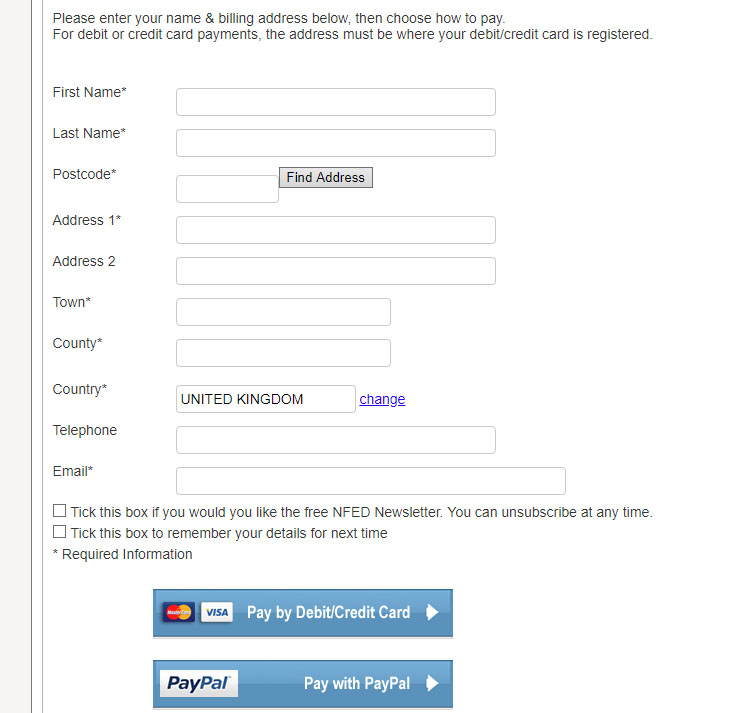 ------------- www.nfed.co.uk Connecting the central southern equestrian community since 1999 |
Replies:
Posted By: ckart
Date Posted: 02 June 2018 at 11:05am
|
Reducing the form field width to 90% has sorted out the spacing, but any ideas on styling the button? ------------- www.nfed.co.uk Connecting the central southern equestrian community since 1999 |
Posted By: ckart
Date Posted: 02 June 2018 at 11:28am
|
Cracked it & looks much better. For anyone else, I was using button { but it needs to be input[type=button] input[type=button] { background: #5F94C9; background-image: -webkit-linear-gradient(top, #5F94C9, #5596be); background-image: -moz-linear-gradient(top, #5F94C9, #5596be); background-image: -ms-linear-gradient(top, #5F94C9, #5596be); background-image: -o-linear-gradient(top, #5F94C9, #5596be); background-image: linear-gradient(to bottom, #5F94C9, #5596be); -webkit-border-radius: 0; -moz-border-radius: 0; border-radius: 4px; -webkit-box-shadow: 0px 1px 3px #EFEFEF; -moz-box-shadow: 0px 1px 3px #EFEFEF; box-shadow: 0px 1px 3px #EFEFEF; font-family: Arial; color: #ffffff; font-size: 16px; padding: 5px 7px 5px 7px; border: solid #1f638d 1px; text-decoration: none; } input[type=button]:hover { background: #3cb0fd; background-image: -webkit-linear-gradient(top, #3cb0fd, #3498db); background-image: -moz-linear-gradient(top, #3cb0fd, #3498db); background-image: -ms-linear-gradient(top, #3cb0fd, #3498db); background-image: -o-linear-gradient(top, #3cb0fd, #3498db); background-image: linear-gradient(to bottom, #3cb0fd, #3498db); text-decoration: none; } ------------- www.nfed.co.uk Connecting the central southern equestrian community since 1999 |